Unlocking Creative Possibilities with a Dingbat Font That Generates Seamless Patterns
Patterns have always held a special place in design. Whether you are building a brand identity, decorating a digital space, or crafting physical products, the right pattern can transform an ordinary project into something visually captivating. However, creating repeating patterns from scratch often involves complex software, tedious manual alignment, and a fair amount of trial and error. That is why a new approach — one that turns the simple act of typing into pattern generation — feels so refreshing. Situjuh Nazara has designed a dingbat font that contains 63 unique seamless patterns, and each one can be accessed just by pressing a key on your keyboard. The concept is elegantly simple, but the practical implications for designers, hobbyists, and content creators are genuinely exciting.
What Makes This Dingbat Font Different from Standard Options
Most dingbat fonts offer individual icons or symbols — a star here, a flower there, maybe an arrow or two. You type a letter, and a specific graphic appears. That approach works well for adding isolated elements to a layout, but it does not help much when you need a full, repeatable surface pattern. This font flips that expectation entirely. Each character in the font corresponds to a distinct seamless pattern. When you type a string of characters, you are not just placing separate icons; you are generating a series of patterns that can tile endlessly without visible seams. The result is a library of Seamless Patterns that you can mix, match, and layer simply by typing different letters. For anyone who has struggled with creating uniform repeats in Illustrator or Photoshop, this feels like a shortcut that actually works.
How Typing Becomes Pattern Creation
The workflow is surprisingly intuitive. You install the font like any other typeface on your computer. Then, in any application that supports font selection — word processor, graphic design software, even a plain text editor — you choose the font and start typing. Each key press produces a different seamless pattern. If you type the lowercase "a," you get one pattern. Typing "b" gives you another. With 63 patterns included, the entire alphabet, numbers, and several special characters are mapped to unique designs. You can type a single character to generate one pattern, or you can type a longer string to create a sequence of different patterns side by side. Because each pattern is designed to repeat seamlessly on its own, you can also fill an entire page with a single character to produce a continuous background texture. This makes the font equally useful for single-pattern fills and for creating patterned text blocks where each letter displays a different motif.
Practical Benefits for Everyday Design Work
One of the most appealing aspects of this tool is how it removes friction from the creative process. Instead of opening a pattern-making tool, defining a tile, exporting it, and then applying it to your project, you can simply type your pattern into existence. That speed matters when you are iterating on ideas or working under a deadline. You can test dozens of pattern options in minutes by typing different characters and seeing the results instantly. The patterns themselves are diverse, covering geometric shapes, organic motifs, abstract textures, and more. This variety means you are unlikely to run out of options for different moods or applications. Whether you need something playful, professional, or purely decorative, there is likely a pattern in the set that fits the tone you are aiming for.
Color Customization Without Extra Work
Another standout feature is how easily you can change the colors. Because the patterns are delivered as font glyphs, they inherit whatever color you apply to the text. That means you can highlight a pattern character in your document and change its hue just as you would change the color of any letter. Want a navy blue geometric pattern for a business card background? Select the character and pick navy. Need a coral version of the same pattern for a social media graphic? Change the color. This flexibility is hard to overstate. In traditional pattern workflows, recoloring often involves opening the source file, adjusting layers, or editing swatches. Here, it takes two clicks. You can also create multicolor effects by typing different pattern characters, assigning each one a different color, and arranging them in a layout. The result is a custom patterned composition that looks layered and complex but was built from a single line of colored text.
Where Seamless Patterns Shine in Real Projects
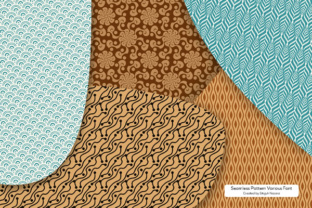
I have found that Seamless Patterns from this font fit naturally into several common use cases. Web designers can use them as background textures for hero sections, blog headers, or hover states on buttons. Because the patterns repeat cleanly, they work well in responsive layouts where the background needs to scale or tile across different screen sizes. Print designers can apply them to flyers, posters, business cards, and packaging mockups. The ability to change colors on the fly makes it easy to match brand palettes without reworking the pattern itself. Social media content creators can use the patterns as backdrops for quote graphics, product announcements, or story backgrounds. Since the patterns are vector-based font glyphs, they remain crisp at any size, unlike raster images that can become pixelated when enlarged.
Textile and Surface Pattern Design
For those working in surface pattern design, this font offers a rapid prototyping tool. You can simulate how a pattern might look on fabric, wallpaper, or wrapping paper by typing the pattern character, scaling it up, and applying different colors. It is not a replacement for dedicated textile design software, but it serves as an excellent idea generator. You can quickly test pattern combinations, see how different motifs interact, and decide which direction to pursue before investing time in a full repeat construction. The 63 patterns provide enough variety to spark new concepts and to mix elements in ways you might not have considered otherwise.
Getting the Most Out of the Font
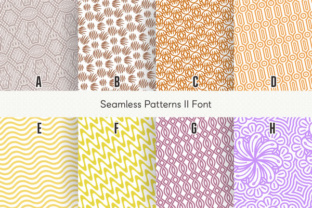
To fully leverage this tool, I recommend spending some time with the specimen file that accompanies the font. The specimen file shows every included pattern mapped to its corresponding key, so you can see at a glance what each character produces. This visual reference saves you from guessing which key gives you a chevron pattern versus a floral repeat. Keep the specimen file open while you work, and you will quickly memorize your favorite patterns. You can also use the specimen as an inspiration board, noting which patterns pair well together and which ones work best at different scales. Another tip is to experiment with character spacing and line height. Because the patterns are designed to be seamless, adjusting the tracking or leading can change how the patterns align when you type multiple characters in a row. Sometimes a tighter spacing creates a denser, more intricate surface, while looser spacing allows each pattern to breathe.
Layering Patterns for Unique Effects
One advanced technique involves layering multiple text boxes, each set to a different pattern character and color, with varying levels of opacity. You can create depth and texture that mimics screen printing or offset layering without leaving your design application. For instance, type a geometric pattern in one color at full opacity, then overlay a second pattern in a complementary color at 30 percent opacity. The result is a custom pattern that feels tailor-made for your project. Because you can adjust colors, opacity, and scaling independently for each layer, the possibilities expand far beyond the 63 base patterns. You essentially have a modular pattern-building system at your fingertips.
Considerations Before You Start Using the Font
While the font is remarkably easy to use, there are a few things to keep in mind. First, not all applications handle font glyphs the same way. Some programs may not render the patterns at full quality in the editing view, though they typically export correctly. It is a good idea to test the font in your primary design tools before committing to a large project. Second, because the patterns are vector-based, they remain scalable, but extremely small sizes may cause fine details to become less distinct. Always preview your pattern at the intended output size to ensure the details hold up. Third, while you can color the patterns easily, you cannot easily change the internal structure of a single glyph. The design of each pattern is fixed, so you work within the shapes provided. That constraint is part of what makes the font so fast to use — you trade unlimited customization for speed and convenience — but it is worth noting if your project demands completely bespoke motifs.
Why This Font Deserves a Place in Your Toolkit
There is a certain joy in discovering a tool that does one thing exceptionally well. This dingbat font does not try to be everything. It focuses on delivering a broad set of Seamless Patterns in a format that anyone can use, regardless of their technical skill level. For experienced designers, it is a time-saver and a source of inspiration. For beginners, it is an accessible entry point into pattern design without a steep learning curve. The fact that you can generate, color, and combine patterns by simply typing makes the creative process feel playful rather than laborious. That ease of use often leads to more experimentation, and more experimentation usually leads to better design outcomes.
A Versatile Creative Partner
I have seen designers use this font for mood boards, for client presentations where they need to show pattern options quickly, and even for educational materials where they teach the basics of repeat patterns. The font adapts to the context. It can be a serious production tool or a playful sketchpad. Situjuh Nazara has packed a remarkable amount of variety into those 63 patterns, and the seamless repeat quality is consistent across the entire set. There are no awkward gaps, no mismatched edges, no surprises when you tile the pattern across a page. That reliability is what makes the font feel polished and professional.
Final Thoughts on Seamless Pattern Fonts
Patterns are a fundamental part of visual communication, and having quick access to a diverse collection of ready-to-use seamless repeats changes how you approach design problems. Instead of dreading the pattern creation step, you might find yourself looking for excuses to add a textured background or a patterned accent. That shift in mindset is valuable. The font by Situjuh Nazara represents a smart fusion of typography and surface design, and it fills a gap that many designers did not realize existed. If you work with digital or print media, if you create content for social platforms, or if you simply enjoy experimenting with pattern and color, this dingbat font offers a practical, creative, and genuinely fun way to bring Seamless Patterns into your everyday workflow. Take a few minutes to explore the specimen file, try typing a few characters, and see where the patterns lead you. You might be surprised at how much a single font can open up your design process.