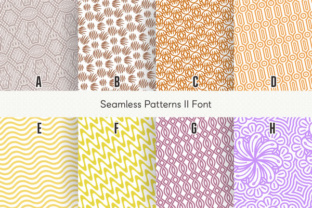
Seamless Patterns II: A Font That Builds Infinite Designs
If you have ever needed a repeating background, a decorative border, or a texture that fits perfectly edge to edge, you know the usual workflow: find an image, crop it, test the repeat, fix the seams, adjust the scale, and hope it holds up. Seamless Patterns II removes that entire process. Created by Situjuh Nazara, this font does not work like a typical typeface. Instead of letters and punctuation, each key produces a unique seamless pattern—sixty-three in total—so you can generate infinite repeats by simply typing.
What Seamless Patterns II Actually Does
Most dingbat fonts give you one icon per key. This one gives you a full tile per key. Every character in Seamless Patterns II is a self-contained pattern that repeats perfectly when placed side by side. You type a letter, you get a tile. You type the same letter again, you get another identical tile that matches up with no visible seam. Want a wall of that pattern? Hold down the key. The result is a continuous, repeating texture that behaves exactly like a traditional seamless tile but is generated entirely through your keyboard.
This approach changes how you think about pattern creation. Instead of searching through stock libraries or firing up a pattern editor, you just pick a character and type. The font handles the alignment, the repeat logic, and the seamless edges automatically. It is a straightforward idea that saves significant time once you start using it.
Sixty-Three Unique Patterns in One Font File
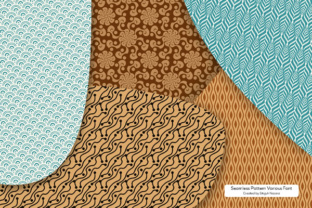
The font contains sixty-three distinct patterns, each mapped to a different character. That means you get more than six dozen ready-to-use tiles in a single installation. The range includes geometric shapes, organic motifs, abstract textures, floral-inspired designs, and repeating line work. Some patterns are dense and detailed, ideal for backgrounds that need visual richness. Others are open and airy, suited for subtle texture or overlay effects.
Having that many options in one font file simplifies your asset management. You do not need to maintain a folder of separate pattern images, track licenses for each one, or worry about resolution limits. The patterns are vector-based, so they scale cleanly to any size without losing quality. Whether you are using them on a business card or a billboard, the result stays crisp.
Changing Colors Instantly
One of the most practical features is color control. Since Seamless Patterns II is a font, you change the pattern color the same way you change text color. Select the character, pick a swatch, and the entire tile updates. No need to open a separate file, adjust a fill, or export a new version. If you are working on a brand project with multiple color variations, you can duplicate the text layer, change the hue, and compare options in seconds.
This also makes it easy to create layered effects. You can set one pattern in a light tone on a dark background, overlay another in a contrasting color, or build a two-tone look by combining different characters at different opacities. The flexibility is useful for mockups where you need to present several design directions quickly.
Practical Applications Across Different Fields
The usefulness of Seamless Patterns II extends beyond graphic design. Here are some realistic ways people are putting it to work.
Branding and Identity Work
When developing a brand, pattern systems add consistency across touchpoints. A repeating geometric pattern can appear on packaging, website backgrounds, social media tiles, and stationery. Because the pattern comes from a font, it stays consistent no matter what software you use. You can type the same character in Illustrator, InDesign, Figma, or even a word processor, and the pattern remains identical. This matters when multiple team members contribute to the same brand system.
Web and Digital Design
For websites and digital products, seamless patterns are often used as background textures, hero section backdrops, or subtle repeating elements behind content. Since the patterns are vector-based, they perform well at different screen sizes and resolutions. You can also convert the font output to SVG or CSS background images if you need a lightweight solution. The fact that you can test a pattern by simply typing a character means you can iterate faster than pulling in raster images.
Print and Publishing
Brochures, flyers, book covers, and zines benefit from decorative patterns that repeat cleanly. With Seamless Patterns II, you do not need to worry about misaligned edges or awkward breaks. The tile fits perfectly every time. If you are designing a booklet and want a consistent background across all pages, you can set the pattern on a master page and type the character once. It is a small time saver that adds up over long documents.
Educational and Instructional Materials
Teachers and trainers who create worksheets, handouts, or presentation slides can use these patterns to add visual interest without distracting from the content. A soft repeating background can define sections, separate activities, or simply make a page feel more polished. Because the patterns are easy to color and scale, you can match them to your existing materials without extra design work.
Product and Packaging Design
Prototyping packaging often requires repeating patterns for wrapping paper, boxes, or labels. Seamless Patterns II lets you produce a mockup quickly by typing the pattern, coloring it to match the product line, and adjusting the size. If the client requests a different look, you switch to another character and see the result immediately. This speed is helpful during early-stage development when many variations need to be explored.
Social Media and Content Creation
Content creators who produce posts, stories, or video thumbnails can use these patterns as backgrounds or accent elements. The variety of styles—from minimal to ornate—gives you options for different moods. A clean geometric pattern works well for a professional post, while a floral design might suit a lifestyle account. Since you can type the pattern directly into design tools, the production process stays simple.
Usability and Efficiency Gains
The main benefit of Seamless Patterns II is how it compresses what used to be a multi-step task into a single keystroke. Finding a pattern, checking if it repeats, adjusting the file format, and placing it in your document takes time. With this font, you skip those steps entirely. You type, you color, you scale, and you are done.
For anyone who works with patterns regularly, the efficiency gain is noticeable. If you produce multiple designs per week, the time saved on pattern sourcing and setup alone can free up hours over a month. The font also eliminates file management overhead. Instead of storing dozens of pattern files, you have one font installed on your system. That is a small change that simplifies your workflow in a real way.
Observations from Using the Font
After spending time with Seamless Patterns II, a few things stand out. First, the patterns are genuinely diverse. You get a wide range of visual styles from a single font, which makes it suitable for many types of projects. Second, the seamless behavior is reliable. Each tile lines up correctly without gaps or visible repetition lines when used properly. Third, the color control works exactly as expected. If you can change text color in your software, you can recolor any pattern instantly.
One practical tip: when scaling the pattern, adjust the font size rather than applying transformations. Increasing or decreasing the point size changes the scale of the tile cleanly because the font hinting handles the vector math. This is simpler than scaling an image and avoids any quality loss.
Practical Considerations Before Using It
Seamless Patterns II works in any application that supports OpenType fonts. That covers most design software, office suites, and web tools. It is a good idea to check the specimen file included with the font to see which pattern maps to which character. The specimen provides a visual reference so you do not have to type each key to find the one you want.
Because the patterns are contained in a font, you cannot edit the individual elements of a tile the way you could with a vector file. If you need to modify a specific shape within a pattern, you would need to convert the font output to outlines and edit from there. For most uses, the tile as provided is sufficient, but it is worth knowing the limitation if your workflow requires heavy customization of individual elements.
Another consideration is output format. If you are delivering final files to a print shop or a developer, you may need to outline the font or embed it so the patterns render correctly. This is standard practice for any decorative font, and the same rules apply here.
Who Will Get the Most Value
Designers who produce pattern-heavy work will see the clearest benefit, but the font is also useful for non-designers who need a repeatable background occasionally. Entrepreneurs creating social media graphics, educators preparing classroom materials, marketers building brand templates, and hobbyists making personal projects will all find it accessible. The learning curve is minimal because the interaction model is typing.
For professionals who already use dingbat fonts in their workflow, Seamless Patterns II expands what you can do with a single typeface. Instead of adding icons one by one, you are adding entire repeating textures. It shifts the role of a font from symbol provider to pattern generator, which is a genuinely different way to work.
The sixty-three patterns cover enough range that most projects will find a match without needing additional assets. Whether you need a subtle textile-like texture for a presentation background or a bold geometric for a poster edge, there is likely a character that delivers it. The ability to color instantly and scale cleanly makes the font practical for both quick mockups and final production.