Dabrush for Smart Designers: How to Nail the Rustic Vibe Without Looking Like a Beginner
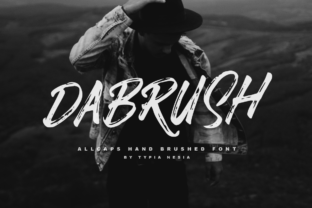
Let’s get straight to it. DaBrush gets a lot of attention because it looks like it has a personality—rough, authentic, and straight off a studio floor. It’s known for its dry brush effect and uneven strokes that add warmth and grit to otherwise flat layouts. But here’s the reality: grabbing a font just because it looks “edgy” often leads to designs that confuse rather than impress. I’ve seen it used poorly more often than I’ve seen it used well. The goal here isn’t just to tell you it’s a great font—it is—but to help you understand where most people trip up. Let's make sure your first or next project using Dabrush hits the mark with intention, not just impulse.
Why “Rustic” Isn’t a Pass for Messy Spacing
The most common mistake I see is treating the font’s rough edges as an excuse to neglect structure. Because Dabrush simulates a dry brush stroke, each glyph has unique, uneven contours. That is its charm, but it also means default kerning and tracking often look sloppy. Dropping it into a design without manual spacing adjustments makes the words feel disconnected.
For example, the gap between a capital “W” and an “A” might look too wide, while a lowercase “r” and “n” might blend together. If you let the software handle it, you get a layout that looks like an accident rather than art. The fix is simple: treat Dabrush like a piece of art. Open your kerning panel in Illustrator, InDesign, or Photoshop. Zoom in. Adjust letter pairs until the rhythm feels intentional. Tighten it up so it breathes, but don’t let it fall apart.
When you control the spacing, the rustic effect looks deliberate. A controlled brush font reads as artistic and expensive. A neglected one reads as a mistake.
Quick checklist for spacing:- Manual kerning is non-negotiable for headlines using Dabrush.
- Wide tracking can work, but only when every letter is equally spaced.
- View your text at 200% zoom to catch awkward gaps.
Display Fonts Stay in the Spotlight
Dabrush is a display font. That means it is designed for short, impactful statements—headlines, logos, pull quotes, or a single word on a merchandise design. Asking it to convey complex information at 12 point is asking for trouble. The dry brush texture that looks amazing at 72 point becomes a blurry, illegible mess at body text size.
I’ve seen entrepreneurs try to write entire product descriptions or mission statements using a brush font. The result is almost always exhausting to read. Here is a better approach: use Dabrush for the hero text only. Pair it with a clean, highly legible sans-serif like Montserrat, Open Sans, or Inter for the supporting roles. Give the brush font room to dominate the top third of the poster, then let a clean font handle the details.
Think about a gig poster. “TONIGHT: DA BRUSH” set in a bold dry brush font works perfectly. The band name, time, and cover charge set in a clean sans-serif underneath provides clarity. That contrast makes both fonts stronger. Asking a brush font to carry a page of dense information is unfair to the reader and the font itself.
Three Checks Before You Press “Download”
You are ready to use Dabrush. Smart move. But there are three technical and creative checks you need to run first to make sure you are getting the real deal and using it properly.
Check 1: License for Commercial Work
Not all brush fonts are licensed for commercial projects. If you are a small business owner or freelancer, read the license agreement carefully. You don’t want to build a brand identity around a font only to discover you cannot legally use it on your website, packaging, or merchandise. Reputable foundries clearly state whether their version of Dabrush includes commercial rights. Pay for the proper license. It protects you and supports the type designer.
Check 2: Character Set and Language Support
Does the font include the glyphs you need? Some brush fonts lack accented characters or extended Latin sets. If your brand name has an “é” or a “ñ,” or if you serve an international audience, verify the character map first. Manually faking a glyph by modifying another letter never looks good. A complete font file saves you that headache.
Check 3: File Quality and Foundry Reputation
Poorly made fonts break in design software. They might have missing anchor points, inconsistent stroke weights, or corrupted hinting. Stick to reputable marketplaces or direct foundry purchases. A high-quality OTF or TTF version of Dabrush will integrate smoothly into your workflow and render correctly across different sizes and mediums. A free knockoff will cost you time and frustration.
The “All Edge, No Balance” Trap in Font Pairing
Another frequent misstep is pairing Dabrush with another highly decorative font. If your headline is a rustic brush font, your subheading should not be a graffiti font or a handwritten scrawl. Two strong personalities in one composition rarely lead to harmony. They compete for attention and create visual noise.
The smarter strategy is contrast. Brush fonts are organic and irregular. Pair them with geometric, rational shapes. A clean, modernist sans-serif or a thin, neutral serif provides the perfect anchor. It gives the eye a place to rest. The brush font provides the emotion and energy. The neutral font provides clarity and structure.
Open a design file. Put “DA BRUSH” at the top in 72 point. Below it, place your secondary text in 24 point Roboto or Helvetica. Feel how solid the structure becomes. Now swap the secondary font for another brush font. It feels wobbly, right? Trust that instinct. Let your brush font be the only star of the show, and let everything else support it.
Color, Texture, and Background Matters
Because Dabrush already contains significant texture, placing it on a busy background is a common mistake. Overlaying a dry brush font on a gritty concrete photo, a wood grain, or a complex pattern makes the letters blend into the noise. The words become hard to read, and the visual impact is lost.
Use solid backgrounds, gradients, or very subtle textures instead. Let the rough edges of the font be the only texture in that area. High contrast works beautifully—black ink on off-white paper, or white lettering over a dark, moody photograph. This makes the brush strokes pop dramatically and keeps the focus on the message.
Think of it as an accent wall in a room. You wouldn’t wallpaper every surface with a loud pattern. You would choose one wall to make a statement. The same logic applies here. Give your brush font a clean stage to perform on.
The Authenticity Test in Branding
This is the hardest conversation to have with yourself as a designer. Just because you love a font does not mean it fits the project. Dabrush screams “handmade,” “streetwear,” “craft coffee,” “hardware,” or “music festival.” If you are designing for a law firm, a medical supplier, or a corporate fintech app, this font will actively fight your message. It will feel like a costume.
Your audience reads your font choices subconsciously. If you use a rough, edgy font for a luxury spa brand, it feels confusing and untrustworthy. If you use it for a skateboard company, it feels authentic and exciting. Ask yourself honestly: Does this font make my brand look more credible, or does it just look cool?
If the answer is not obvious, go with a safer option for the main identity. Dabrush is a powerful tool, but it is not a universal solution. When the context is right, it elevates a project from generic to memorable. When the context is wrong, it undermines credibility. Trust the context.
Bringing It All Together
DaBrush is not just a font. It is a design element with a specific job to do. When you respect its limitations—display only, needs space, craves contrast—it rewards you with incredible presence. The designers who succeed with rustic brush fonts are the ones who treat them as deliberate creative choices, not just free downloads.
Before you use it next time, run through this quick checklist:
- Is this a headline or short statement? (Yes = Good. No = Reconsider.)
- Have I adjusted the spacing manually?
- Am I pairing it with a clean, neutral counterpart?
- Does the background support the grit instead of fighting it?
- Does the brand actually benefit from an edgy, handcrafted vibe?
If you checked all those boxes, you are ready. Dabrush will elevate your work from generic template to statement piece. Use it with intent, and let those rough edges do exactly what they were designed to do—add honest, unapologetic character to your best work.