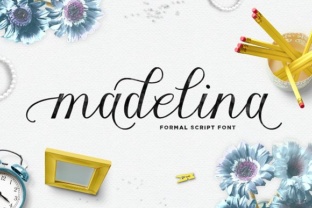
Madelina: Handwritten Font for Diverse Audiences
When you stumble upon a handwritten font that feels both personal and polished, it’s worth a closer look. Madelina, created by Area Type, is one of those typefaces. It carries the warmth of hand-lettering while maintaining the clarity needed for real-world use. Whether you’re putting together a logo, writing a blog header, or designing a worksheet, Madelina offers a human touch without sacrificing legibility. Below, we’ll break down what makes it interesting, why different people might choose it, and how to decide if it fits your next project.
What Makes Madelina Different
Handwritten fonts can feel like a gamble. Some are too quirky for body text; others lack character. Madelina strikes a balance. It has natural flow, consistent stroke weight, and a relaxed but not sloppy appearance. The letterforms are slightly condensed, which helps them sit well in both headings and short paragraphs. Because it comes from Area Type, a foundry known for thoughtful design, you can expect clean curves, readable spacing, and a set of glyphs that covers most European languages. The font works across print, web, and mobile, and it includes standard ligatures and alternates that add variety without overwhelming the reader.
Who Might Care About Madelina
Different audiences will look at Madelina through different lenses. What matters to a freelance designer may not matter to a small business owner or a teacher. Let’s explore how various people might evaluate and use this font.
For Creators and Freelancers
If you design for a living – whether that’s branding, social media graphics, or digital products – you’re probably always on the lookout for typefaces that feel fresh but not gimmicky. Madelina can serve as a reliable tool in your kit. Its hand-drawn quality works well for:
- Logos and wordmarks where you want a personal, boutique feel.
- Social media posts that need a friendly, approachable look.
- Product packaging mockups for small-batch or artisanal goods.
- Website headings that break away from rigid sans-serifs.
For a freelance brand designer, the cost of a single font can be a real consideration. Madelina sits in the mid-range for a professional font – not free, but not exorbitant. If you’ll use it across multiple client projects, the investment pays for itself quickly. You also gain from the font’s flexibility: you can pair it with a clean serif for body text or use it on its own for a minimal look. Beginners in design might find the font easy to integrate because its spacing is forgiving and it doesn’t require complex kerning adjustments.
For Small Business Owners and Marketers
If you run a coffee shop, an online boutique, or a coaching practice, your visual identity matters. Madelina can help you communicate warmth and authenticity without hiring a designer for every little asset. You could use it for:
- Menu boards or price tags.
- Email newsletter headers.
- Business cards or flyers.
- Simple landing page titles.
What you likely care about is reliability – will the font display correctly across devices and printers? Madelina is a well-made OTF/TTF font, and as long as you follow the licensing terms, it works on most platforms. For a small business owner who isn’t a tech expert, the ease of installing and using the font matters a lot. You don’t want to fiddle with OpenType features; you just want to type and have it look good. Madelina’s default settings are solid, so you can use it out of the box. If you ever want to swap alternate characters for a more custom look, the option is there – but it’s not required.
Commercial use is another priority. Madelina’s license covers most small-scale commercial projects. Always double-check the specific EULA from Area Type, but generally, using it for your own business materials is fine. That makes it a safe choice for entrepreneurs who want professional results without per-project fees.
For Educators and Content Creators
Teachers, workshop leaders, and online course creators often need materials that feel inviting. A strict, formal font can make learning seem dull. Madelina adds a human dimension. You could use it for:
- Worksheet titles or instruction headers.
- Slide deck titles for videos or presentations.
- Posters or handouts for in-person classes.
- Social media graphics that promote your lessons.
For an educator, legibility is paramount. Madelina’s letters are distinct and not overly ornate. Students reading from a screen or a printed page won’t struggle to tell a lowercase l from an uppercase I. That’s a big win over many decorative scripts. Also, if you create PDFs or worksheets that parents might print at home, you need a font that embeds reliably. Madelina should embed cleanly in most software, so your materials maintain their look wherever they’re opened.
For blog content creators, Madelina can give your post headers a friendly personality. If you write about lifestyle, travel, or parenting, a handwritten font often matches the informal tone. But use it sparingly – one or two lines per page – to keep the reading experience comfortable. Heavy paragraphs in a script font tire the eyes quickly, so Madelina works best for short bursts of text.
For Hobbyists and Beginners
Maybe you’re new to typography or just want to make your personal projects more fun. Madelina is a good entry point because it’s not overly complex. You can download the trial version (if available) or purchase the full set and start typing immediately. Beginners often wonder: will this font look good in my scrapbook, blog, or invitation? The answer depends on the tone you want. Madelina leans casual but neat, so it suits birth announcements, birthday invitations, printable planners, and even custom gift tags.
What hobbyists typically value is cost-effectiveness and versatility. If you only use a font for a few holiday cards each year, spending a lot might not make sense. Madelina’s price is moderate; you can judge whether the number of uses justifies the purchase. Alternatively, consider that a single font can be reused for many projects over years. That long-term usefulness often tips the scale. For beginners, the font’s ease of use – just install and type – means you spend time creating, not troubleshooting.
How Priorities Change with Experience
Your skill level shapes what you look for in a font. Beginners tend to focus on appearance and simplicity. They want something that looks good without needing extra adjustment. Madelina delivers on that front. Experienced users, on the other hand, consider flexibility and technical quality. They might dig into the OpenType features – like stylistic alternates for those who want to avoid repeated letters looking identical. Madelina includes a handful of alternates, giving seasoned designers room to customize. The font also supports a wide character set, which matters if you work with multiple languages or need special punctuation.
Another priority that shifts with experience is pairing. A novice might use Madelina alone. A professional will want to combine it with a complementary sans-serif or serif for body text. Because Madelina’s proportions are fairly standard, it pairs well with many neutral fonts (like Open Sans, Lora, or Montserrat). That kind of compatibility is a sign of a well-constructed typeface.
Practical Examples Across Roles
- Freelance graphic designer: Uses Madelina in a brand identity project for a children’s bookstore. The font appears in the logo and on social media templates. The client loves the handmade feel. The designer appreciates the alternates for the wordmark, avoiding duplicate shapes.
- Small bakery owner: Buys Madelina to design her own signage for cupcake labels and a chalkboard-style menu. She isn’t a design expert, but the font is easy to use in Canva and Microsoft Word. Her printed signs get compliments from customers.
- Online course creator: Adds Madelina to the title slides of her video lessons on gardening. The friendly look matches her teaching style. She also uses it for workbook section headers. Students find the materials engaging and clear.
- Parent making birthday invitations: Downloads the font to create custom invitations for a child’s party. The casual script fits a backyard theme. The project is quick and doesn’t require advanced design software.
Is Madelina Right for You?
Before you invest in any font, it helps to ask a few questions:
- What kind of project(s) will I use it for? If you need a handwritten font for short headlines, branding, or decorative text, Madelina is a strong candidate. For long body copy, look elsewhere – even the best script fonts tire the eye after a few sentences.
- How important is a personal, friendly tone? Madelina excels where you want to avoid a corporate or sterile look. If your audience expects authority and formality, a classic serif or clean sans might be safer.
- Am I willing to invest in a quality font? Free fonts exist, but they often lack the polish, character variety, and licensing clarity of a professional typeface. Madelina offers consistency and a known pedigree from Area Type.
- Do I have the technical comfort to install and use a new font? Installation is simple on Mac and Windows, and most design apps detect new fonts automatically. Even beginners can manage with a one-minute guide.
Madelina isn’t a Swiss Army knife – no single font is. But it fills a specific niche: a handwritten font that’s approachable, well-made, and suitable for a wide variety of personal, educational, and professional uses. Whether you’re designing a brand, marketing your small business, creating classroom materials, or just sprucing up a project for fun, Madelina could be the touch of humanity your text needs. Take a look at the font specimen, try the trial if available, and see if its rhythm matches your message. That’s the only way to really know if a typeface will feel like yours.