Natalia: Adding a Handwritten Touch to Your Digital Workflow
Handwritten fonts occupy a specific space in typography—they suggest immediacy, personality, and a human presence that perfect geometric typefaces often lack. Natalia, created by Area Type, is one such font that balances the informality of handwriting with enough structure to remain useful in professional contexts. Understanding where it fits in your process, how to integrate it with existing tools, and when to deploy it can make the difference between a design that feels forced and one that communicates naturally.
What Natalia Offers and Where It Belongs
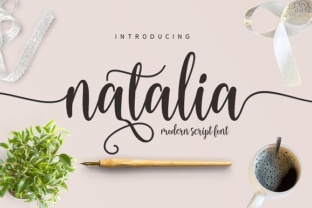
Natalia is a handwritten font with a fluid, slightly irregular stroke that mimics the flow of a pen across paper. It is not a script font in the traditional sense—there are no elaborate swashes or extreme flourishes. Instead, it offers a clean, readable letterform with subtle variations that make it feel personal without sacrificing legibility. This positions it well for projects where you want to convey a warm, approachable tone without overwhelming your audience.
In a workflow context, Natalia is best thought of as an accent or headline tool. It can anchor a brand identity, draw attention to a call-to-action, or add texture to a minimalist layout. It is not designed for extensive body text, but for short, impactful phrases that benefit from a human touch. This constraint is important—using it wisely saves you the trouble of trying to force a handwritten style where a more neutral face would perform better.
Integrating Natalia Before, During, and After a Project
The most strategic use of Natalia happens when you consider the entire project lifecycle, not just the final design.
Before the Project: Setting the Tone
Early in the planning phase, selecting a typeface like Natalia can guide your overall visual direction. If you are developing a brand for a small business—say a local café, a wedding planner, or a creative freelancer—choosing Natalia early helps you define the voice. You can pair it with a clean sans-serif for body text and a neutral serif for headings, establishing a hierarchy that will inform every subsequent decision. At this stage, you are not designing yet, but you are building a framework. Having Natalia as a reference point helps you evaluate other elements—color palette, imagery style, layout grid—against the handwritten feel you want to preserve.
During the Project: Prototyping and Iteration
Once design work begins, Natalia can be applied to mockups quickly in tools like Adobe Illustrator, Figma, or Canva. Because it is a standard OpenType font, it works across platforms without special setup. Use it for placeholder headlines or testimonials to see how the informal character reads at various sizes. This is also the time to test pairing—combine Natalia with a geometric sans like Montserrat or a humanist serif like Source Serif Pro to check contrast and readability. During iteration, note any readability issues at small sizes (below 14–16px) and adjust your usage plan accordingly. If Natalia becomes too difficult to read when scaled down, reserve it for larger display roles.
After the Project: Final Polish and Export
In the final stages, Natalia can elevate specific elements without reworking the whole layout. Use it for pull quotes, section headers, or signature-style callouts. If you are producing a PDF report or a digital magazine, applying Natalia to chapter titles or introductory paragraphs adds a hand-touched feel that breaks up the monotony of pure sans-serif text. At this point, consistency matters—check that all instances of Natalia follow the same size, color, and weight across screens or pages. Export formats (PDF, web, social media image) may affect text rendering, so test on the final medium to ensure spacing and stroke details remain crisp.
Compatibility with Tools and Digital Assets
Natalia works with any application that supports standard OpenType features. This includes the Adobe Creative Suite, Sketch, Figma, Canva, Affinity tools, and even Microsoft Word or Google Docs for light branding tasks. If you are building a brand kit, you can upload Natalia to cloud font managers like Adobe Fonts (if licensed) or include it in a project’s asset folder for team access.
For web use, check the license terms from Area Type—some handwritten fonts restrict embedding. If you host the font yourself via @font-face, test performance and load times. Natalia’s character set may include ligatures or alternate glyphs; enabling the “stylistic alternates” feature in design software gives you access to subtle variations that can prevent letter repetition from looking mechanical. This is particularly useful for longer quotations or repeated words like “and” or “the” where uniform letterforms would betray the handwritten illusion.
Maintaining Consistency and Readability
Readability is the main constraint when using any handwritten font. Natalia is relatively clean, but its organic strokes still require careful sizing and spacing. Practical tips:
- Use it for short text only – headlines of 3–8 words, names, short phrases, or single lines. Avoid blocks longer than 20–30 words.
- Control line height – increase line spacing to 1.4–1.6 times the font size to prevent descenders from colliding with ascenders on the line below.
- Pair with a neutral font – a simple sans-serif or serif provides the structural contrast that makes Natalia stand out. Avoid pairing with another script or highly decorative face.
- Watch color and background – on dark backgrounds, increase font weight or use a lighter shade of the font color to maintain contrast. Handwritten fonts with thin strokes can get lost on busy backgrounds.
- Maintain a single voice – if you use Natalia for your main logo, use it consistently for the tagline, social media headers, and email signatures. Scattering it randomly across collateral dilutes the effect.
Small Business Branding
A boutique bakery needs a logo. You choose Natalia for the business name in the header, pair it with a minimalist sans-serif for the address and phone number, and apply the same combination to the website hero section and Instagram profile. The font’s handwritten quality suggests artisanal care, while the clean body text keeps the design professional. On the product packaging, Natalia appears only on the flavor label, not the ingredients list—preserving both readability and brand character.
Email Newsletter Headers
For a creative entrepreneur’s weekly newsletter, use Natalia for the subject line graphic (if embedded as an image) or for the opening greeting in the HTML body. In a plain-text email, the font won’t render, so reserve it for email templates where you control the CSS. Many email builders like Mailchimp or ConvertKit allow custom font imports; if not, use Natalia in a banner image. This maintains the handwritten tone without relying on fallback fonts.
Social Media Quotes
When sharing a motivational quote on Instagram or LinkedIn, set the quote text in Natalia at a large size (60–80pt) on a solid background, and add the author’s name in a smaller sans-serif below. This creates visual hierarchy and makes the quote feel personal. For carousel posts, use Natalia for the title slide and switch to a more readable font for subsequent slides with longer text.
Organizing Your Font Library for Long-Term Use
As you accumulate fonts, clarity around usage rights and file formats reduces friction later. Natalia from Area Type is a commercial font, so check whether you have a desktop license, web license, or both. Keep a separate folder for project-specific fonts, and within that, name your files clearly (e.g., “Natalia-Regular.otf”). In team settings, use a shared font management service like Universal Type Server or a cloud drive with a read-only fonts folder. Version control is rarely an issue for static fonts, but if Area Type releases an update, know which project files reference the font so you can test for compatibility without breaking existing layouts.
If you work across multiple operating systems, note that Natalia may render slightly differently on Windows versus macOS due to screen rendering. Test on the primary platform for your final output. For print, the font should behave consistently if the file remains embedded.
When to Choose Natalia Over Similar Options
Natalia competes with other handwritten fonts like Learning Curve, Pacifico, or Playlist. The main differentiators are its relatively neutral stroke weight and high readability. If your project demands a more playful or ornate script, another font might be better. But if you need a handwritten style that can coexist with professional layouts, branding guidelines, and corporate-style headers without looking out of place, Natalia is a strong candidate. Consider the audience: adults aged 20–50 in creative or business fields respond to handwriting that looks purposeful, not casual. Natalia’s controlled irregularity strikes that balance.
Making It Feel Intentional
The risk with any handwritten font is appearing like a quick shortcut. To counter this, treat Natalia with the same care you would a custom lettering piece. Pair it deliberately, control its density, and ensure every instance serves a purpose. When your audience sees a handwritten element, they should register warmth or personality—not a missing body font. With the right sizing, pairing, and placement, Natalia becomes a consistent tool in your design process rather than a novelty. Test it in a low-stakes project first, observe how it performs in your typical outputs, and then broaden its role as you confirm its fit. That approach keeps your workflow efficient and your output genuinely effective.