The Black Box: Building Custom Retro Banners and Ribbons with a Single Font
Finding the right visual element to give a project a retro, handcrafted feel can be time-consuming. You might spend hours hunting for the perfect banner graphic, ribbon shape, or ornamental detail. Often, the options you find are either too generic, not customizable enough, or require complex vector editing. The Black Box offers a practical alternative: a single condensed sans serif font that doubles as a modular design system for creating unique banners, ribbons, and decorative frames. Instead of searching for pre-made graphics, you can build exactly what you need using letters, symbols, and ligatures. This article explains how The Black Box works, why it solves common design frustrations, and how different users can put it to use right away.
What Is The Black Box and How Does It Work?
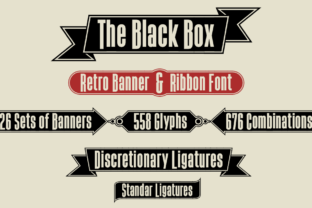
At its core, The Black Box is a condensed sans serif typeface. But its real purpose is not just typing text. The font includes 26 sets of "box closers" — individual character shapes that, when combined, form the corners, sides, and connectors of a rectangular frame or banner. With 26 sets available, there are 676 possible combinations. That means you are not limited to one or two pre-made banner shapes. Instead, you can mix and match corners and connectors to produce a wide variety of ribbon styles, banner lengths, and frame proportions.
The font also includes keys for basic ornaments, which are accessed through simple keystrokes. For example, typing a specific character might produce a decorative dot, a line end, or a flourish. These small details help you add finishing touches without needing additional graphics. The Black Box also supports ligatures — special character combinations that merge into a single glyph. One practical example is the Bitcoin symbol ligature, which is triggered by typing the letter "b" in a specific context. This feature makes the font useful for projects involving cryptocurrency themes, but the modular design system is the main draw for most users.
The Challenge: Avoiding Generic Templates and Speed Bumps in Retro Design
Many designers, small business owners, and content creators want a retro look that feels authentic and unique. But common obstacles get in the way. Pre-made banner graphics from stock sites are often overused. You see the same shapes on multiple websites, social media posts, and printed materials. Customizing those graphics requires software skills that not everyone has, and even simple edits can turn into a lengthy process of ungrouping, reshaping, and repositioning vector points.
Another challenge is consistency. When you use separate graphics for different banners on the same page or project, the style might vary. Corners might look mismatched, stroke weights might differ, or ornamental styles might clash. The Black Box solves this by providing one unified design system. Every banner you create uses the same basic shapes, so your work stays visually coherent. You can adjust the length, width, and details of each banner without losing the overall aesthetic.
Time pressure is also a real concern. If you need to produce multiple banners for a sale, event, or social media campaign, you cannot afford to build each one from scratch in a drawing program. The Black Box turns banner creation into a typing task. You simply type the right sequence of characters, and the banner appears. Adjustments are made by deleting or adding characters, not by redrawing paths. This speed is a major advantage for anyone who works under tight deadlines.
How The Black Box Helps You Build Banners Faster and with More Control
The Black Box addresses these challenges by putting the design process back in your hands. Instead of relying on someone else's template, you control every aspect of the banner's shape and size. The 26 box closer sets give you options for different corner styles — some rounded, some pointed, some with decorative notches. You can choose a set that matches the mood of your project: playful, sharp, vintage, or minimal.
Because the system uses letters and symbols, you can type a banner in any text editor, word processor, or design software that supports OpenType features. This includes familiar tools like Adobe Illustrator, Photoshop, InDesign, Affinity Designer, and even Microsoft Word or Google Docs with the right setup. You don't need to learn a new application or master complex panel menus. If you can type and change a font, you can create a custom banner.
The modular approach also means you can reuse the same corner set across multiple banners while varying the length. In a typical ribbon design, the top and bottom sides are made from repeated characters. Typing more of those characters extends the ribbon. Typing fewer shortens it. This flexibility lets you fit banners to different text lengths or layout sizes without distorting the design.
Practical Applications and Real-World Outcomes
The most direct use of The Black Box is creating retro-style banners and ribbons for headings, callouts, sale signs, and event announcements. A blogger might use it to highlight the title of a special series. A social media manager could build a series of ribbon graphics for a weekly promotion, each with a different length to fit the copy. A small business owner printing flyers for a sidewalk sale can generate consistent banner graphics in minutes, then drop them into a layout.
The Bitcoin symbol ligature is a notable feature for anyone working in the cryptocurrency space. Instead of inserting a separate image or symbol, you type a regular letter, and the font supplies the Bitcoin icon. This keeps your text clean and eliminates the need to switch fonts or embed graphics. It also helps maintain a cohesive visual style if you are producing branded materials for a crypto-related project.
Ornaments add another layer of utility. You can place decorative elements at the start or end of a banner, or use them as standalone flourishes. This is useful for dividing sections in a newsletter, creating a vintage-looking header, or adding a period-appropriate detail to a poster. Because the ornaments come from the same font, they naturally fit with the banner shapes you have already chosen.
In practice, users report that the main outcome is saved time and greater design autonomy. Instead of browsing through endless template packs, they open a document, choose their corner set, type the banner, and move on. The final result looks intentionally designed, not pasted from a generic collection.
Examples and Recommendations for Getting Started
To begin using The Black Box effectively, start by reviewing the character map or the font's documentation. Identify the 26 corner sets and note which keystrokes produce them. Then test a few combinations to see how they connect. A typical workflow is: choose a left corner character, type the top row characters (repeating as needed for width), then add a right corner. For the bottom row, you mirror the process with the corresponding bottom corners.
For a simple ribbon, you might use one of the more straightforward corner sets. For a banner with decorative notches or angled ends, choose a set with those features built-in. Keep a small test file where you try out different combinations so you can quickly refer back to them later.
When using the Bitcoin ligature, check that your software supports OpenType ligatures. In most design programs, this is a setting in the character panel or OpenType menu. Once enabled, typing the designated letter sequence automatically produces the symbol. If you are working in a program that does not support ligatures, you may need to access the symbol through the glyph panel instead.
A good practice is to plan your banner text first, then build the banner around it. Decide the approximate width you need, then type the top row characters to match. This avoids running out of room or having a banner that is too large for your text. Because the font is condensed, the letters inside the banner take up less horizontal space, so you can fit longer phrases without making the banner excessively wide.
How Different Users May Approach The Black Box
A graphic designer working on multiple client projects will likely focus on the variety of corner sets. They might create a library of banner templates using different sets and save them as reusable assets. This allows them to offer distinct styles for different brands without starting from scratch each time. They can also pair The Black Box with other condensed sans serif fonts for a cohesive typographic system.
A small business owner or entrepreneur probably cares more about speed and ease. They may not need every corner set, but they will appreciate being able to produce a polished banner in under a minute. Their approach is to learn one or two corner sets that fit their brand personality and use them consistently across social media, email headers, and printed signs.
Hobbyist creators and DIY content producers might explore the ornamental keys more heavily. They could use The Black Box to make decorative borders for blog posts, handmade cards, or video thumbnails. The modular nature gives them room to experiment, and the low learning curve means they can start making things immediately without studying a manual.
Educators and workshop leaders could use The Black Box as a teaching tool for typography or modular design. It provides a clear, hands-on example of how characters can serve dual purposes — as letters and as building blocks for visual elements. Students can see how constraints (only 26 sets) actually enable creativity by forcing them to think combinatorially.
Useful Considerations for Getting the Most Out of the Font
While The Black Box is easy to start using, a few considerations will help you avoid common pitfalls. First, always check the spacing between banner sections. Because the font relies on character shapes, kerning and tracking can affect how smoothly the corners connect to the sides. In some software, you may need to adjust tracking slightly to close small gaps. A tracking value of zero is usually fine, but if you see a tiny separation, a small adjustment can fix it.
Second, remember that the font works best at larger sizes where the frame detail is clearly visible. Using it at small point sizes may make the corners and ornaments look cramped. For banners, a size of 24 points or larger is a safe starting point. For ornamental details, even larger sizes may be needed to preserve the intended look.
Third, test your chosen corner set with the actual text you plan to use. Some corner sets have a strong vintage character and may clash with very modern sans serif body text. Others are more neutral and blend with a wider range of styles. Try a few combinations before committing to a final design.
Finally, if you are using The Black Box on the web, you will need to use a web font service or self-host the font files to ensure proper rendering. SVG or image-based banners are an alternative if font embedding is not an option, but the real advantage comes from keeping the banner as live text that can be edited later.
Why The Black Box Fits a Practical Design Workflow
The Black Box stands out because it does not try to be a complete design tool. Instead, it solves a specific problem: creating custom retro banners and ribbons quickly, without relying on pre-made graphics. The 26 box closer sets, 676 possible combinations, and included ornaments give you room for variety without overwhelming you with options. The Bitcoin ligature is a thoughtful addition for a niche need, but the core value is in the modular banner system.
For anyone who regularly needs banner graphics and wants to maintain a consistent, handmade aesthetic, this font provides a reliable method. It respects your time, gives you control, and does not require you to learn complex software or hunt for the right template. Whether you are a professional designer, a business owner, or a creative hobbyist, The Black Box offers a practical way to get from idea to finished design in fewer steps.