Aintzane: Integrating a Handwritten Font into Your Design Process
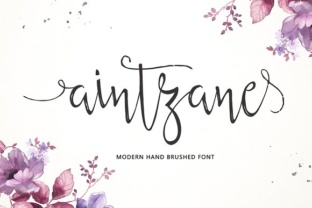
Aintzane is a handwritten font from Area Type that brings a natural, organic quality to digital projects. Rather than being just another decorative typeface, it functions as a practical asset when you understand where it fits in your broader creative or business workflow. Whether you are a professional designer refining a brand identity, a small business owner creating marketing materials, or a blogger adding personality to your posts, Aintzane can streamline your process without adding unnecessary complexity. The key lies in how you prepare for its use, implement it during design, and maintain consistency across all applications.
What Aintzane Brings to Your Toolkit
Handwritten fonts serve a specific purpose: they introduce human warmth into digital communication. Aintzane, with its fluid strokes and natural variation, excels at creating an approachable tone. But its value extends beyond aesthetics. In a workflow, a font like Aintzane can save you time that would otherwise be spent manually writing or illustrating text, while still delivering a bespoke look. It interacts well with other tools in your stack, such as Adobe Creative Suite, Canva, or web design platforms, where it can be loaded and used immediately after installation. The font’s design also complements clean sans-serif or serif typefaces, making it a strong candidate for headings, pull quotes, or accent text.
Preparation: Setting Up for Smooth Integration
Before you use Aintzane in a project, preparation ensures you avoid common pitfalls. Start by downloading the font from Area Type and installing it on your operating system. If you work across multiple devices, consider using a font management tool like FontBase or RightFont to keep Aintzane organized and accessible. This step is especially relevant for teams or freelancers who juggle various clients and projects. Next, open a test file in your primary design application to check how Aintzane renders at different sizes and on different backgrounds. Handwritten fonts can lose legibility when scaled down, so test it for body text versus display use. For most workflows, Aintzane works best for headlines, subheads, or short blocks of text where its personality can shine without compromising readability.
Pairing with Other Fonts
In practice, Aintzane rarely works alone. Pair it with a neutral sans-serif such as Open Sans, Lato, or Montserrat for body copy. The contrast between a clean geometric font and Aintzane’s irregular strokes creates visual hierarchy and guides the reader’s eye. For a more refined look, try a serif like Playfair Display. Prepare these pairings in advance by saving a typography palette in your project file or brand style guide. This preparation step helps you maintain consistency across materials, whether you are designing a one-off social graphic or a multi-page brochure.
Using Aintzane During the Design Phase
When you begin a project, Aintzane can be integrated at multiple points. During the brainstorming and moodboarding phase, use the font in mockups to test the emotional tone. For instance, a branding project for a handmade goods store might start with Aintzane in the header of a wordmark exploration. As you iterate, the font helps you decide whether the organic feel aligns with the brand values. During execution, apply Aintzane to key elements such as logo text, social media overlay titles, or website hero headings. Because handwritten fonts can feel informal, reserve Aintzane for projects where that tone fits, such as lifestyle blogs, event invitations, educational materials, or small business packaging.
Real Workflow Example: A Blogger’s Header Design
Consider a freelance blogger who wants to rebrand their site with a more personal voice. They plan to use Aintzane for post titles and keep the body text in a clean sans-serif. The workflow might look like this:
- Open the blog template in a web builder or design tool.
- Replace existing header fonts with Aintzane, adjusting letter spacing and line height for readability on screens.
- Preview on desktop and mobile to ensure the font size works. If needed, increase the font weight or add a subtle shadow for contrast.
- Pair with a consistent sans-serif for paragraph text, saving the combination as a reusable style.
- Export the updated design and test across different browsers.
This integration takes under an hour but sets a consistent visual tone that carries across future posts. The blogger can then reuse the saved styles, improving efficiency over time.
Maintaining Consistency with Aintzane Across Assets
Once you have used Aintzane in a project, your next priority is consistency. This factor is critical for marketers, brand managers, and entrepreneurs who produce multiple assets. If Aintzane appears in email headers, it should appear with the same size, weight, and color in social media graphics. Create a small brand guide that specifies where and how to use the font. For example, define Aintzane for primary headings only, and note the minimum size for legibility—often 24pt or larger on digital platforms. Also, consider the file format. For web use, ensure you embed the font via CSS @font-face or use a service like Google Fonts if Aintzane is available. If you are sharing design files with collaborators, include the font file or outline the text to avoid missing font errors.
Quality Control Checks
Handwritten fonts can exhibit quirks, such as inconsistent line weight or ascender height. Run a quality control pass after designing: check Aintzane for readability at small sizes, especially on low-resolution screens. If you are printing physical materials, test the font on paper to see how the ink density holds. Adjust kerning manually in problematic letter pairs, as automated spacing may not account for the irregular shapes. These checks prevent issues that could undermine the professional appearance of your work.
Long-Term Use and Iteration
Integrating Aintzane into your long-term workflow involves more than a one-time installation. As your projects evolve, you may need to revisit how the font is used. For instance, a business might start with Aintzane in a few social posts and later expand to packaging or signage. When scaling, consider whether the font’s character still matches the brand’s other visual elements. Update your style guide accordingly, and archive old versions of brand files if you switch to a different typeface. Additionally, keep your font license current. Area Type may offer updates or new weights, which can expand your options without requiring a redesign. Regular font maintenance—like clearing unused fonts and updating your system—keeps your workflow efficient and reduces clutter.
Organizing Font Assets for Teams
If you work with a team, establish a font repository where everyone accesses the same version of Aintzane. This prevents discrepancies in file rendering and saves time troubleshooting mismatched fonts. Use a shared cloud folder or a font management platform that allows permissions. For freelancers, simply keeping a local backup of the installer file ensures you can reinstall quickly on a new machine. Organization might seem minor, but it directly affects how smoothly you can implement design changes months after a project launches.
Practical Observations and Common Pitfalls
From a usability standpoint, Aintzane works best in short text blocks. Avoid using it for large bodies of text, as the handwritten style can cause eye strain over extended reading. Instead, designate it for emphasis. Another observation: the font pairs well with white space. Because it carries visual weight, giving it room to breathe improves overall composition. In terms of efficiency, relying on a single font for multiple purposes might seem faster, but it often leads to monotony. Reserve Aintzane for specific contexts—like introductions or calls to action—to preserve its impact. Finally, when preparing files for clients or print, always convert Aintzane text to outlines or embed it, especially if the recipient does not have the font installed. This proactive step avoids last-minute formatting errors.
Integrating Aintzane into Broader Workflows
Beyond design, Aintzane can support educational content, such as PowerPoint presentations, infographics, or online course materials. A teacher creating handouts might use it to mimic chalkboard writing, while a marketer designing a newsletter could capitalize on its friendly tone to boost engagement. The font also works well in video thumbnails or slide titles, where its handwritten quality contrasts with digital-like graphics. The key is to view Aintzane as a tool that fits into your process at the moment you need to convey approachability. By preparing, testing, and organizing its use, you ensure that it enhances your work rather than distracts from it.
Aintzane is more than a pretty typeface. When integrated thoughtfully, it becomes a workflow efficient tool that saves time on custom illustration, reinforces brand personality, and helps you produce consistent, high-quality output across projects. Whether you are a one-person creative shop or part of a larger team, taking the time to plan how Aintzane fits before, during, and after your design process pays off in both efficiency and visual coherence.