Chamfort: A Flexible, Humanistic Sans-Serif for Clear Communication
When selecting a typeface for a project, the decision often comes down to balancing personality with practicality. You want a font that feels distinctive yet remains highly readable across different sizes and media. Chamfort, a typeface family named after the French writer and aphorist Nicolas Chamfort, offers an interesting blend of geometric structure and humanistic warmth. With six weights—Thin, Light, Regular, Medium, Bold, and Black—each paired with a true italic, Chamfort provides a versatile toolkit for designers, content creators, and anyone who needs a reliable, multifaceted typeface. This article explores what makes Chamfort distinct, how it compares with similar typeface styles, where it excels, and what tradeoffs you should consider before choosing it for your next project.
What Makes Chamfort Distinct?
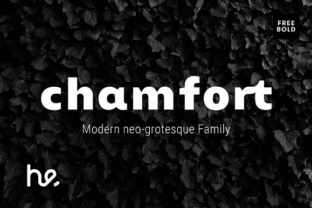
Chamfort is a sans-serif typeface that mixes the clarity of geometric shapes with the approachability of humanistic strokes. Unlike purely geometric fonts such as Futura (which are built on strict circles and straight lines), Chamfort introduces slight variation in stroke width and more open apertures, making it friendlier and less mechanical. The letterforms feel solid and stable, yet the humanist influences—like a subtle calligraphic quality in the italic—add a layer of warmth. This combination helps Chamfort stand apart: it is neither coldly precise nor overly casual. It feels purposeful, modern, and quietly intelligent.
Another key distinction is the availability of true italics across all six weights. Many sans-serif families offer only oblique (slanted) versions, but Chamfort’s italics are designed with distinct shapes, particularly in letters like ‘a’, ‘e’, and ‘f’. This makes italic text genuinely complementary rather than just a slanted afterthought. For anyone who values nuanced typography—whether in body copy, headings, or branding—this attention to detail is a significant advantage.
Comparing Chamfort with Similar Typeface Styles
If you are evaluating typeface options, you are likely comparing several sans-serif families that combine geometric structure with humanist readability. Chamfort sits in a niche that includes other hybrid sans-serifs. Here are some relevant comparisons you might consider when making your choice.
Geometric vs. Humanist Emphasis
Chamfort tilts toward the humanist end of the spectrum, but without the extreme calligraphic roots of a typeface like Optima or Syntax. Its geometric foundation gives it a crisp, modern look, while the humanist details improve legibility at small sizes. For example, the double-storey ‘a’ and ‘g’ are more recognizable than the single-storey versions found in many geometric fonts. This can reduce reading fatigue in longer passages. If your project requires a clean appearance but also needs to be easy on the eyes for extended reading, Chamfort offers a strong compromise.
Weight Range and Flexibility
Having six weights—from Thin to Black—allows Chamfort to cover a wide range of applications. The Thin weight is delicate, best used for display sizes or subtle overlays. The Light and Regular weights work well for body copy, especially in user interfaces or editorial layouts. Medium and Bold offer enough contrast for headings and emphasis without becoming heavy-handed. The Black weight is powerful but retains readability; it can be used for large headlines or posters. Unlike some families where certain weights feel like an afterthought, Chamfort’s weights are consistently drawn, maintaining the same character across the family. This coherence is a practical benefit when you need a single font family for an entire project.
Italic Design
True italics are a notable strength. Many similar fonts in this category offer only oblique versions, which can feel stiff. Chamfort’s italics have a genuine cursive influence, with slightly narrower proportions and more fluid shapes. This is especially useful for quotations, book titles, or any text that requires a change in rhythm without switching to a completely different font. If you often use italic text for nuance or citation, Chamfort’s italics will not disappoint.
Readability and Legibility Tradeoffs
One of Chamfort’s core claims is that it is very easy to read, even at small font sizes. The open apertures—the openings in letters like ‘c’, ‘e’, and ‘a’—help prevent confusion at 10px or 12px. The x-height is generous, which is beneficial for small text on screens or in print. However, there is a tradeoff: the same humanist details that improve legibility can make the typeface appear slightly less “pure” than a strict geometric design. If your goal is a stark, minimal aesthetic, Chamfort’s warmth might feel too friendly. Similarly, the contrast in stroke width, while modest, is still more than you would find in a monolinear font like Helvetica. This can affect how Chamfort behaves in very bold settings or in tightly packed layouts. For most uses, these subtle variations are an asset, but it is worth testing the font at the actual sizes and media you plan to use.
Best-Fit Situations: Where Chamfort Shines
Chamfort is particularly well-suited for projects that require a professional yet approachable tone. Here are a few realistic examples:
- Corporate communications – Annual reports, whitepapers, and internal documents benefit from Chamfort’s solid, clean look. The multiple weights allow you to create clear hierarchies without adding extra fonts.
- User interfaces – The legibility at small sizes makes Chamfort a good choice for web apps or mobile interfaces, especially where you need to display both headers and body text within the same family. The true italics work well for labels, tooltips, and call-to-action variations.
- Editorial design – Magazines, blogs, and long-form articles can use Chamfort for both headlines and reading text. The humanist touch reduces eye strain, while the geometric underpinnings keep the layout looking organized.
- Brand identity – If your brand wants to convey reliability with a touch of sophistication, Chamfort’s balance between structure and warmth is effective. It works across print and digital, from logos to brochures.
Limitations and When to Look Elsewhere
No typeface is perfect for every scenario. Chamfort may not be the ideal choice if you need extreme contrast (such as in a high-fashion editorial) or a very geometric, rigid look that demands absolute uniformity. Its humanist details add a layer of organic feel that some minimalists might find distracting. For ultra-condensed spaces, such as narrow tables or tight navigation bars, Chamfort’s letter spacing might not be as economical as a narrower family. Additionally, while Chamfort’s italics are beautiful, they may not pair well with highly ornate display fonts—the family is best used on its own or with neutral complements.
If your project calls for a purely mechanical, engineering-like feel (think technical documentation or data-heavy dashboards), a monolinear geometric sans might serve you better. Similarly, if you need extensive language support beyond Latin-based alphabets, it is important to check Chamfort’s character set to ensure it meets your requirements.
Making an Informed Decision: Key Factors to Evaluate
When comparing Chamfort with other typeface options, focus on these decision factors:
- Readability at target size – Test Chamfort at the sizes you will actually use. Its small-size legibility is strong, but always verify with your specific content.
- Weight needs – Do you need all six weights? If you only need one or two, Chamfort still works, but you might also consider a more specialized family. However, having the full range gives you flexibility for future expansion.
- Italic usage – If your text rarely uses italics, this may not be a differentiating factor. But if you rely on them for emphasis, Chamfort’s true italics are a solid advantage.
- Tone and audience – Consider whether your audience responds better to a warmer or more neutral typeface. Chamfort strikes a middle ground, which appeals to a broad demographic, especially adults aged 20–50 who appreciate clarity plus character.
- Technical integration – Check licensing, file formats (web, desktop, app), and performance if using on the web. Chamfort is available in modern font formats, but always confirm compatibility.
Practical Comparisons: How Chamfort Fits in Your Toolkit
Think of Chamfort as a reliable all-rounder that can serve as both a text and display face. Unlike many families that excel in one area, Chamfort is designed to be flexible. For example, you could set a blog’s headlines in Chamfort Bold, body text in Chamfort Regular, and pull quotes in Chamfort Medium Italic—all using a single download. This reduces load times and licensing complexity. In a print brochure, the Thin and Black weights create dramatic contrast for covers, while the Light and Regular weights handle the interior text.
If you frequently switch between digital and print projects, Chamfort’s consistent rendering across platforms is another strength. Its humanist forms hold up well on lower-resolution screens, and its geometric clarity remains sharp in high-resolution print. This cross-medium reliability is a practical benefit for freelancers or small teams who cannot afford to maintain multiple font libraries.
Final Thoughts on Choosing Chamfort
Selecting a typeface is a personal and strategic decision. Chamfort offers a well-crafted balance between structure and humanity, giving you a font that feels solid and sophisticated without being cold. Its six true weights and italics provide a depth that many comparable families lack. While it may not suit every extreme use case—like ultra-minimalist branding or highly condensed layouts—it excels in the vast middle ground where most real-world projects live. By understanding its strengths and tradeoffs, you can decide whether Chamfort is the right foundation for your communication needs. Test it with your actual content, compare it with your shortlisted options, and trust your own reading experience. That is ultimately the best guide.